What beafk is
The agent CLIs you already pay for, kept working while you are away from the keyboard — free on your own Mac, and on any machine you own, watched from your phone.
You already use an agent CLI. You type what you want, it goes away and works
for twenty minutes, and for those twenty minutes you sit in front of a laptop
waiting to answer one question and press one button.
beafk moves that work onto a machine you own, and puts the machine on your
phone. The machine can be the Mac you are reading this on — that part is free
and takes two presses — or a box somewhere else that keeps going with the lid
of this one shut.
The agents run there — not in your browser, not on our servers. You open a
chat on a train, read what it did, answer the thing it stopped to ask,
and put the phone away. Nothing ends when you close the tab.
And it is not one at a time. Start a chat on Claude, another on
GPT, a crew on the job that wants both — then go to the gym, get on a plane,
have the afternoon that is not this. They work with nobody watching. In the next
free minute you have, you read what each one came back with, answer the one that
stopped to ask, and send it on.
Every CLI you have, from one chat
You pay for two or three agent CLIs. In a terminal you still use one at a
time — whichever one you opened. The rest sit idle. And the one you opened
is doing the parts it is bad at as well as the parts it is good at.
Talk to one agent here. It hands pieces to the right CLIs, and brings every
result back to the same thread. That is the crew. A
piece goes where it belongs:
- something small and fast, to go and find where things are;
- your strongest coder, to write the code;
- an agent from a different maker, to read the diff afterwards.
It reads what each one sends back, and tells you what came of it.
These are the command-line tools their makers ship: Claude from
Anthropic, GPT from OpenAI, Grok from xAI, Kimi from Moonshot.
Installed as they come, signed in as you, on the subscriptions you already pay
for. Nothing of ours is added to any of them — whatever each one is good at, it
is still good at here.
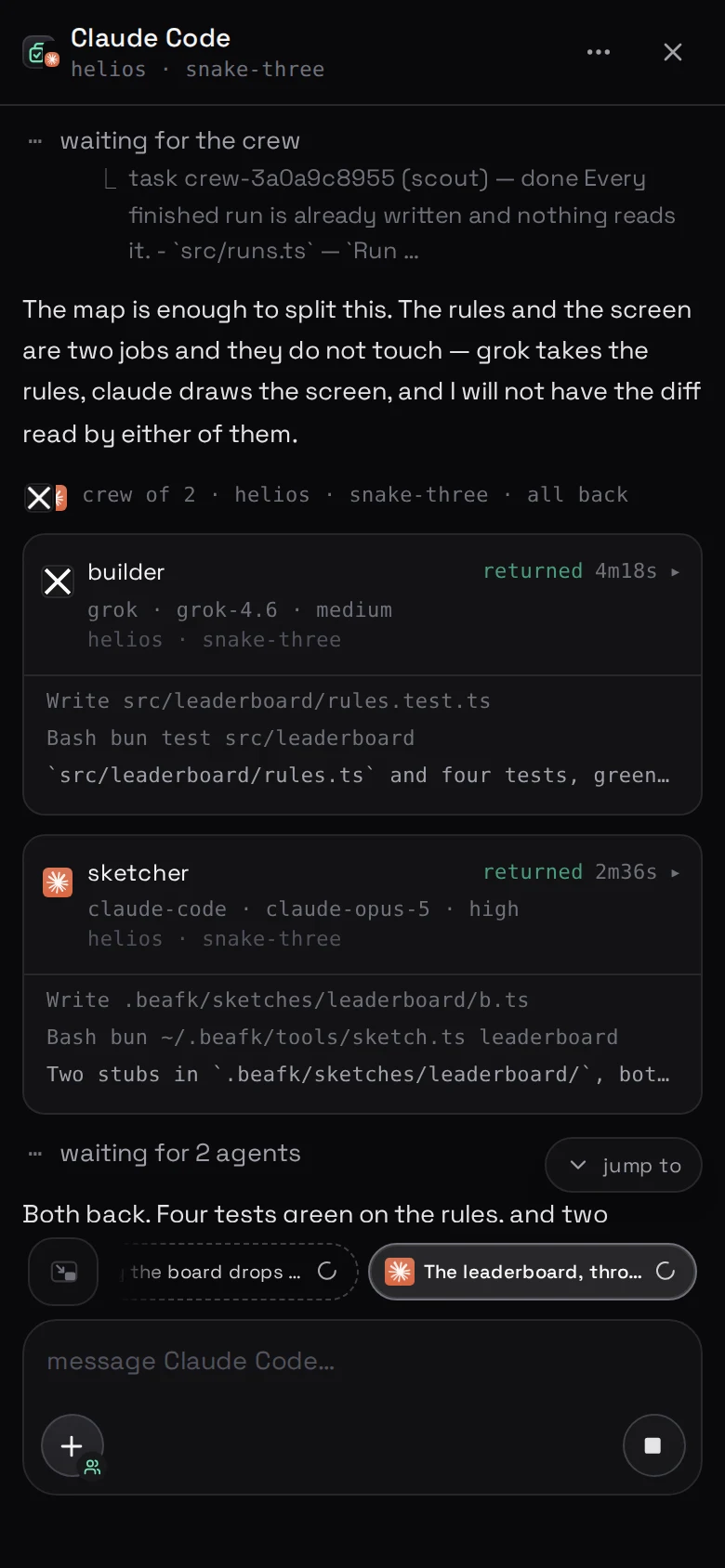
One chat. Every subscription you pay for, working at the same time, and one
thread that tells you how it went.
Which agents beafk runs is the list in full.
Nobody else's computer
The repositories, the chats, the logs and the agents' keys are on your
machine and stay there. Your browser talks straight to it over your own
private network — this website is asked whether it may, and is not in the
chat after that.
That is a boundary rather than a policy: there is no copy of your code on our
side to leak, subpoena or train on, and the machine deliberately listens on
loopback only. What beafk can see is the whole list,
field by field.
The three pieces
Your phone · the panel, in a browser
Your machine · agents, code, logs
This website · who may open what, and the bill
Your machine. Start with the Mac you are reading this on: the
free app turns it into one in two presses, with no
terminal and no card. It can equally be a box somewhere else — the machine
under your desk, a spare laptop, a cheap VPS — on Debian, Ubuntu or macOS.
Either way what is on it is a small program, also called beafk, which looks
after the agents, the projects, the logs and the settings, and answers only to
you.
This website. It knows which machines are yours, who is on your
team, who is allowed to open what, and it is where the bill lives. It never
holds your code, your chats or your agents' keys.
The panel. The screen you actually use, designed for a phone. Your browser
opens it and talks straight to your machine — not through us. We hand your
browser the permission to do that, and then we are out of the way.
What you keep
Your subscriptions. beafk sells no model, resells nobody else's tokens and never
sees what you spend: every message goes on the plan that agent is signed in
with, billed to you by whoever you already pay.
You also keep the machine. Your Mac was always yours; a server you rent we do
not rent to you, cannot stop and cannot delete. If you stop paying us, the
machine is still yours and everything on it is still there.
That is the whole of what beafk charges for: the machines you connect, one
price each — and, on Business, the workspace they sit in, where everybody you
invite is free. Nothing else here is marked up, because nothing else here is
ours to sell — what it costs is the figure.
What it is not
Every limit worth knowing before you pay is on one page —
what beafk does not do — and the short answers
to the usual questions are in
questions people ask.
It is not an editor, and it does not ask you to give yours up. If you are
arriving from one that has an agent in it,
moving from Cursor is what changes and what does
not.
What to read next
beafk on your Mac is the whole thing end to end on
the computer in front of you, and it is two presses.
What you need is the shopping list — most of it is
things you already have — and if the machine is a box somewhere else,
your first machine is that walk in three steps.
If a word is new, the glossary has it in one sentence.
It is free on your own Mac, and there is no card.
Get beafk for Mac — or, if the machine is somewhere else,
your first one is free for seven days with no card:
connect a machine.
[!TIP]
Every page here is also a plain markdown file — add .md to its address —
and /docs/llms.txt is the list of all of them, for an agent
you send to read this.