Watching a crew
A card for every piece of work handed out, the full transcript behind each, and one thread that tells you when they land.
A crew turns one chat into several. This is how you read it without
losing the thread.
The cards
Every piece of work handed out grows a card in the chat: which role took
it, which agent and model it is running on, and what it is doing right now. They
fill in at their own pace — two come back in seconds, the one reading a large
diff takes a minute.
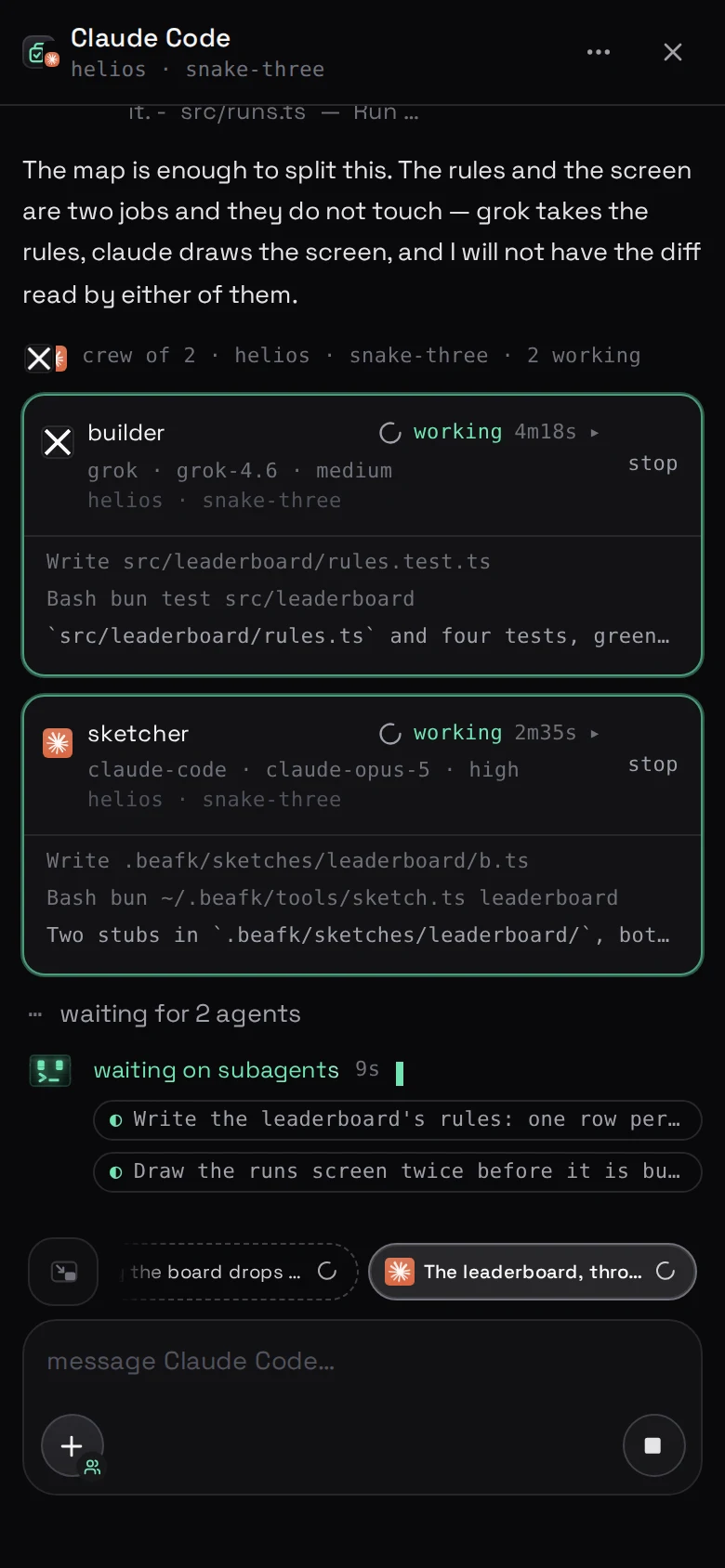
The column is in the order the work was handed out, not the order it comes back,
so it does not reshuffle while you read it. A card that says it is waiting is a
piece that has been filed and will start as soon as one of the others finishes —
three run at a time.
Opening one
Tap a card and you get that agent's own transcript: everything it did, in full,
exactly as if it were a chat of its own. Because it is one.
Reading what the reviewer actually looked at is the difference between a review
and a rubber stamp.
Coming back
Close the card and you are back on the lead chat, which carries on: the
pieces land, the lead agent reads them, and it tells you what came of it.
While you are away
Put the phone down. They keep working, the lead keeps collecting and handing out
what comes next, and it is all in the thread when you come back.
If one of them stops to ask something, that question reaches you the same way any
other does. See when an agent needs you.
When one goes wrong
An agent that failed says so on its card, and the transcript behind it says why
— an agent that is not signed in, a model that refused, a command that did not
exist. The lead chat carries on with what it did get.
The most common cause is a role naming an agent that is not signed in on this
machine. Signing an agent in fixes it, and the run
can be repeated.